

The screening engine behind every SecurePoint decision
This is not a standalone check-box feature. SecurePoint Screening is the shared intelligence layer used across visitor, workforce, vendor, and education workflows to screen identities, route exceptions, and preserve defensible audit evidence.
Coverage
OFAC, BIS, UN, EU, and UK list screening in one workflow.
Decision model
AI-assisted review support with human accountability for material outcomes.
Operations
Reusable across check-in, roster, recurring-person, and evidence workflows.
Visitor Screening
Multi-list sanctions check with AI matching
Try a sample screening:
Click a sample name above to see the screening in action
Interactive demo • Non-functional preview of SecurePoint USA screening
One engine, multiple SecurePoint workflows
Buyers are not purchasing a narrow visitor-screening widget. They are purchasing the screening layer that supports front desk operations, education screening, recurring populations, and downstream compliance review inside the broader SecurePoint platform.

Visitor and lobby operations
Run screening before badges print, access is approved, or hosts are notified. Built for facilities that cannot afford manual lookups at the front desk.

Education and tuition screening
Apply the same engine to tuition payors, sponsors, faculty, roster imports, and recurring campus relationships without separate tooling.

Workforce, vendor, and recurring populations
Re-screen employees, contractors, and vendors continuously (nightly and on demand) with human-reviewed hits and evidence exports, instead of one-off manual checks.
Watch a possible match get reviewed
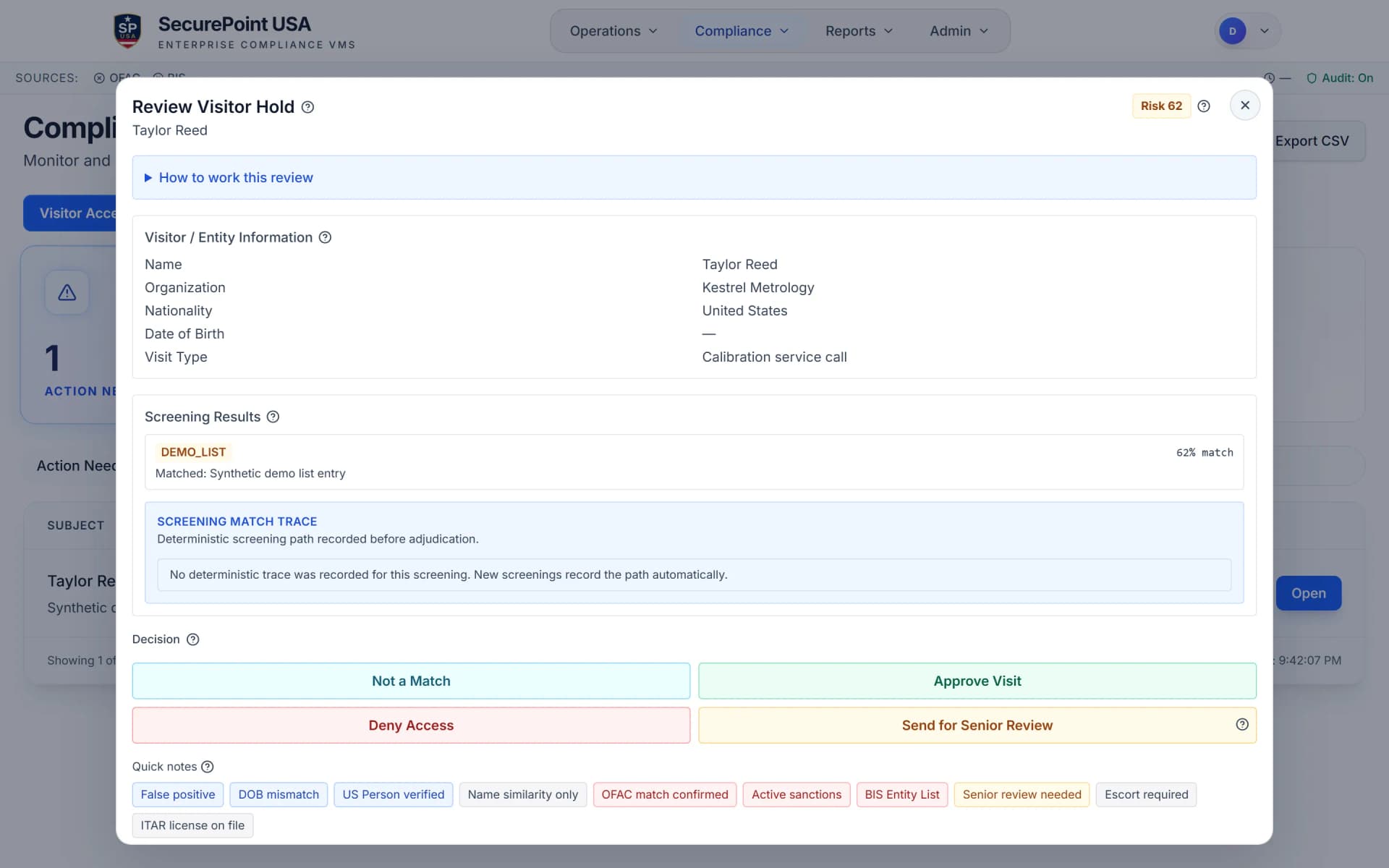
A visitor is screened at check-in, a possible match holds the visit, and a reviewer records the decision and the reason.
Read the transcript
Visitors are screened against lists like OFAC's SDN list, the BIS Entity List, and the UN, UK and EU sanctions lists.
When a name comes back as a possible match to someone on a list, the visit is held. No badge can print until a person reviews it.
The case goes to the compliance queue, which shows how long each review has been waiting.
Open it to see exactly what matched: the listed name, the list it's on, and how closely the names compare.
Compare that with what you know about the visitor. Then record your decision and the reason: not a match, approve, deny, or send it for senior review.
The decision is saved with who made it and when, and the visit can continue.
SecurePoint Visitor. Screen visitors at check-in, and keep the decisions on record.
How to screen a name with the Screening API
Once the Screening API is turned on for your organization: send a name to prescreen with your API key, read the result, and fetch the stored screening by its ID.
Read the transcript
Step 1. SecurePoint turns on the Screening API for your organization and issues your API key.
Step 2. POST the name to prescreen as the subject, with your key in the Authorization header. The key identifies your organization, so you don't send one.
Step 3. Read the result: a screening ID, a risk level and score, the number of possible matches, and whether review is required.
When review is required, the name goes to your compliance team's review queue, and the status reads pending.
Step 4. Keep the screening ID. Later, GET the screening by that ID to read the stored result.
Screen visitors at check-in. Keep the decisions on record.
Designed for operational pressure, not demo-only moments
Screening a name is the easy part. What decides whether a control holds is how the rest behaves: current list coverage, difficult names, where exceptions route, and whether the trail survives scrutiny a year later.
Screen once, cover every major list
A single check runs across OFAC, BIS, UN, EU, and UK sources so teams are not stitching together separate tools or manual searches.
Resolve hard matches faster
Fuzzy matching, transliteration, alias handling, and ownership logic help reduce manual triage before a reviewer ever opens the case.
Escalate only when policy requires it
Potential hits flow into adjudication and export-control workflows with the context reviewers need to make a defensible decision.
Keep the evidence without rebuilding it later
Every run preserves the lists checked, result context, linked record IDs, and downstream decisions so audits do not become spreadsheet projects.
What enterprise teams expect from the engine
The questions that actually decide this: what gets screened, how hard matches are handled, what changes after a list update, and whether the resulting evidence holds up during review.
Official list coverage
OFAC SDN, BIS Entity List, UN, EU, and UK sanctions data screened together in one workflow.
Ownership and affiliate logic
Support for OFAC 50% ownership enforcement and affiliate-style escalation for more defensible trade-control reviews.
Name matching depth
Fuzzy, phonetic, transliteration, and alias-aware matching designed for real-world identity variance.
Reviewable risk context
AI helps summarize the signal. Authorized staff still own the final decision and the audit record.
Freshness and rescreening
List refresh operations and repeat screening workflows help catch changes after the original clearance event.
Audit-ready recordkeeping
Screening results stay linked to visits, people, organizations, and follow-on review actions for clean evidence packs.
Screening is strongest when it is not isolated
Screening that ends at a result leaves the work half done. The same record carries into adjudication, export-control review, and the evidence you export later.
Adjudication Queue
Escalate possible hits into structured human review with reason codes, reviewer accountability, and linked evidence.
Explore workflowITAR and EAR workflows
Carry screening outcomes into export-control steps when nationality, facility access, or technology exposure requires more controls.
Explore workflowAudit logs and evidence packs
Pull a defensible record of what was screened, what was found, and how the organization responded.
Explore workflowScreening engine FAQs
What is sanctions screening for visitor management?
Sanctions screening in visitor management checks visitor identities against official restricted-party and sanctions sources (for example OFAC and BIS) before granting physical access. In regulated facilities, this helps reduce export-control and reputational risk by ensuring your check-in workflow includes a consistent, documented screening step.
Which sanctions lists should regulated manufacturers screen against?
The right set depends on your risk profile and programs, but common sources include OFAC sanctions, BIS restricted-party data, and other government and multilateral sources relevant to your operations. The goal is consistent coverage and traceable evidence of what was checked, when it was checked, and who made the final access decision.
How do you handle false positives in sanctions screening?
False positives are handled with a documented review step: potential matches are flagged for human adjudication, additional context is considered, and the final decision is recorded. For audit readiness, keep the match details, timestamps, decision maker, and rationale, without storing unnecessary personal data.
Do AI tools replace compliance decisions in sanctions screening?
No. AI can assist with match review by surfacing potential matches and summarizing risk signals, but access decisions should remain with authorized personnel. The defensible approach is “assistive, not determinative,” with append-only audit logging of both the recommendation and the human decision.
Replace manual screening with a defensible operating system
Show your team how the SecurePoint screening engine fits your visitor, workforce, education, or export-control workflow before the next audit or onboarding cycle does it for you.