

The audit record should be the hardest thing in the system to mess with
SecurePoint Audit Logs is built to feel more like a vault than a generic reporting page. When a team needs proof months later, the record should still be there, still make sense, and still look defensible under pressure.
Write posture
Append-only history rather than soft, casual, editable records.
Retention
Historical evidence stays available with the context needed to defend it.
Exports
Evidence packs carry the chain-of-custody story forward after export.
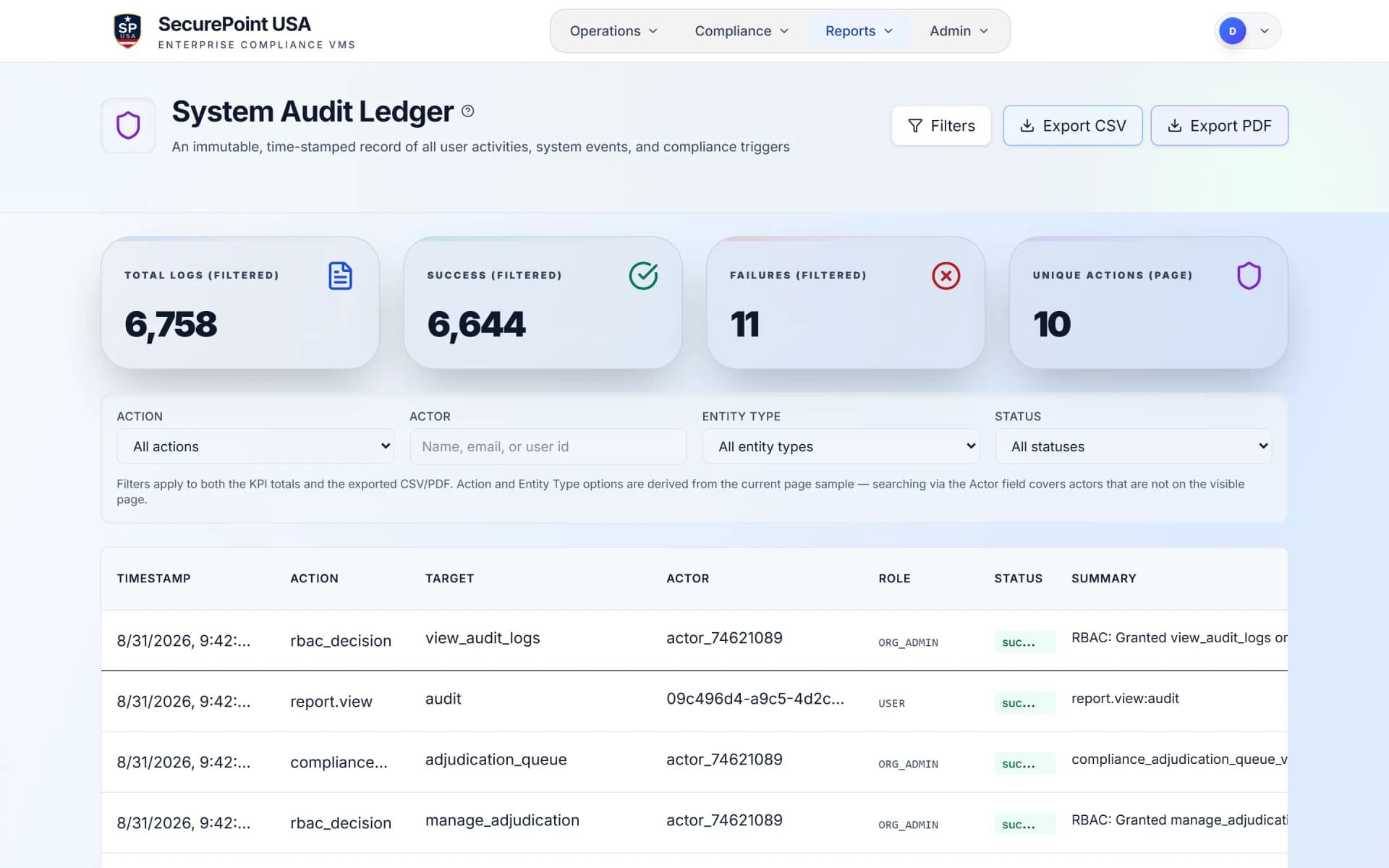
Not just stored. Locked.
The log is difficult to tamper with because of how it is built, not because a policy document asks people not to. Update and delete are refused at the database, and every row is chained to the one before it.
Preserve the original story of the event
Keep attribution attached to every action
Export proof that still feels credible outside the app
Append-only by design
The audit layer is built around write-once event history so the compliance record is preserved instead of continuously overwritten.
Tamper-evident exports
Evidence packs include integrity-oriented metadata so teams can demonstrate that exported records stayed intact after generation.
Vault posture
Records built to stay attributable and hard to rewrite
Append-only by design
The audit layer is built around write-once event history so the compliance record is preserved instead of continuously overwritten.
Tamper-evident exports
Evidence packs include integrity-oriented metadata so teams can demonstrate that exported records stayed intact after generation.
Tenant-isolated records
Organization-scoped access controls keep one customer from crossing into another customer's audit history.
Retention that survives real audits
When teams need historical proof, the record should still be there with the timeline, actor, and decision context attached.
What the vault protects in the real world
These are the moments an audit log has to hold up: retrieving a record, reviewing a decision, and defending a past action.

An assessor asks who entered a controlled site and what happened next
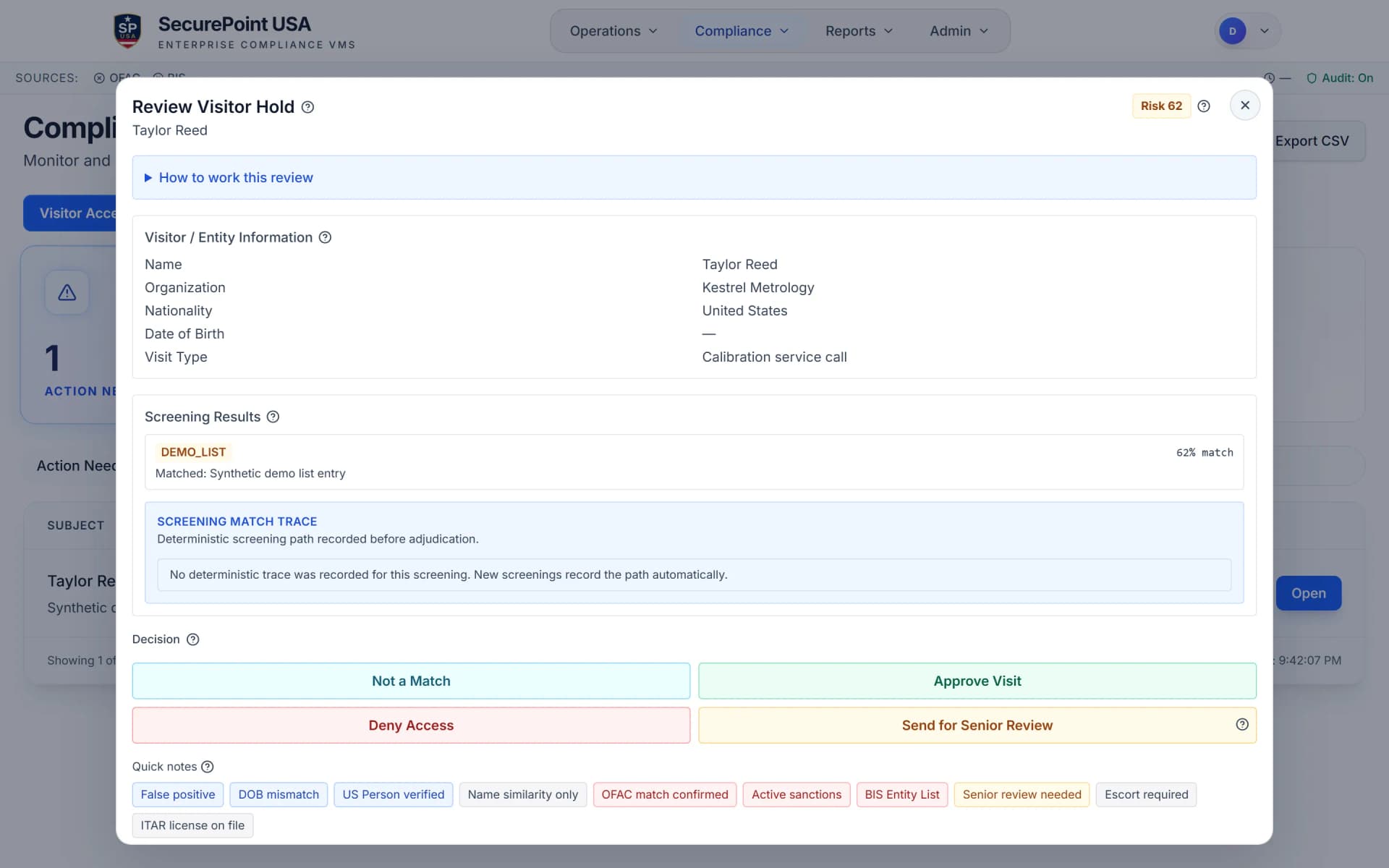
Pull visitor activity, screening results, badge actions, and adjudication outcomes from one continuous record instead of hunting across separate tools.
See visitor workflows
A school needs proof of who reviewed a payer or sponsor case
SecurePoint preserves case history, reviewer actions, and export-ready evidence so education teams are not rebuilding documentation by hand.
See education workflows
A held transaction needs a defensible record months after the decision
The same audit posture can support transaction-level review, hold, release, and evidence export inside SecurePoint Trade.
See trade workflowsWatch an evidence pack get built
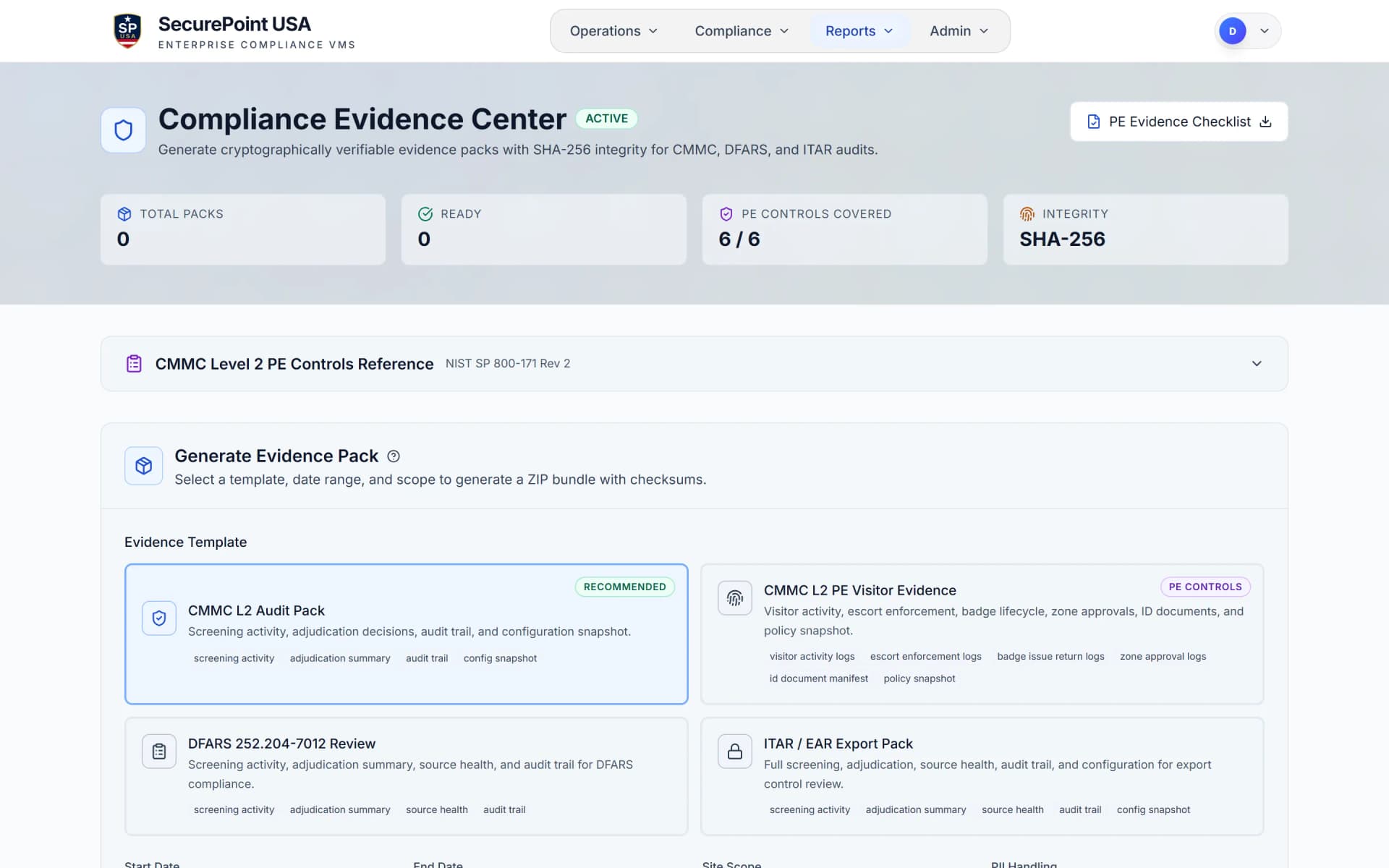
Pick a template and a date range, get a ZIP whose manifest lists a checksum for each file, then open the audit ledger to see who did what and when.
Read the transcript
When an auditor asks how visitors were screened, an admin opens the Evidence Center and picks a template and a date range.
SecurePoint builds a ZIP file with screening results, review decisions and audit records from that period, and its manifest lists an SHA-256 checksum for each file.
Each pack's settings stay in the history, so the same period can be rebuilt later as a new pack.
The audit ledger shows who did what, and when: check-ins, screening results, reviewer decisions, and exports.
Users can't edit or delete ledger records, and exports from this page come with an SHA-256 checksum.
SecurePoint Visitor. Screen visitors at check-in, and keep the decisions on record.
How to rebuild an evidence pack for a past visit
Find the check-in date, generate a pack whose dates cover the visit, check each file against its checksum, and rebuild it later from Evidence Pack History.
Read the transcript
Step 1. In Visitor Audit, under Reports, find the visitor's check-in date.
Step 2. In Evidence Packs, pick a template, and dates from before the visit to a few days after.
Step 3. Select Generate to download a ZIP of screening results, review decisions and audit records for those dates.
Step 4. Open the ZIP's manifest. It lists an SHA-256 checksum for each data file, so you can check each one.
Step 5. To rebuild it later, select Download ZIP in Evidence Pack History. It builds a new pack from current records, with the same settings and its own checksum.
Screen visitors at check-in. Keep the decisions on record.
What leaves the system when you export proof
An evidence pack should do more than dump rows into a file. It should preserve the story of the event, the controls attached to it, and the integrity signals that help a reviewer trust what they are looking at.
Timeline and actor trace
Who acted, when they acted, what changed, and what system or reviewer initiated the event.
Controls mapping
Evidence aligned to frameworks, policy checkpoints, and the control language assessors and reviewers actually ask about.
Screening and adjudication context
Source list references, match context, queue transitions, reviewer notes, and final dispositions in one chain.
Integrity and export proof
Package-level metadata, manifest details, and downloadable exports designed for internal review and external scrutiny.
Built for the reviews that actually matter
The point is not to overwhelm the buyer with framework acronyms. It is to show that the audit vault is purpose-built for regulated review environments where traceability, attribution, and historical access are non-negotiable.
CMMC and NIST 800-171
Support audit and accountability expectations with system-generated records, actor attribution, timestamps, and reviewable evidence.
DFARS and defense programs
Give program and security teams evidence that visitor controls, screening steps, and reviewer actions were actually executed.
ITAR-oriented retention
Preserve visitor and compliance history long enough for real export-control scrutiny instead of relying on short-lived operational logs.
Cross-product evidence posture
Use one audit model across visitor, education, and trade workflows so evidence packages feel consistent across the enterprise.
Enterprise signal
Retrieval, review, and retention are built for regulated pressure, not bolted on after the first audit asks for them.
Audit vault FAQs
What makes SecurePoint audit logs different from normal application logs?
They preserve a compliance record rather than developer telemetry. Update and delete are refused at the database, each row is chained to the previous one with a SHA-256 hash, and event history, reviewer actions, and evidence exports stay tied together so the record is retrievable later.
Can someone just edit or delete an audit record?
The audit posture is built around append-only history and controlled evidence generation, not editable spreadsheet-style records. The point is to make the record resistant to casual tampering and easier to defend during review.
What happens when we need records long after the original event?
SecurePoint is designed so historical records remain available with the context that makes them useful: who acted, what was screened, what was decided, and what evidence was exported.
Is this only for visitor logs?
No. The same audit architecture supports visitor workflows, education screening programs, recurring population reviews, and SecurePoint Trade evidence so proof does not live in different systems.
A log your auditors do not have to second-guess
Closer to a vault than a reporting screen: update and delete refused at the database, a SHA-256 chain linking each row to the one before it, and exports that carry their own integrity signals.