
SecurePoint Visitor
An ITAR visitor management system that holds up in an audit
SecurePoint USA provides visitor check-in, sanctions and watch-list screening, adjudication, and badge issuance as a hosted subscription service for regulated facilities. Screen visitors against OFAC, BIS, UN, EU, and UK lists at check-in. Route flagged matches into structured adjudication. Carry badge indicators, escort requirements, after-visit reporting, and evidence exports through the same workflow. From the lobby kiosk to the audit file.
Structured adjudication
After-visit evidence
Badge and escort indicators
Predictable defense pricing

Full Visit Lifecycle
From preregistration to proof
SecurePoint Visitor manages every phase of a facility visit with structured workflows, real-time coordination, and an append-only audit trail at each step.

Before Visit
Preregistration & preparation
- Host preregistration with visitor details
- Automated visitor instructions and notifications
- Pre-screening before arrival
- Site-specific access requirements configured

Arrival & Check-In
ID capture, screening, and badge control
- Government ID scanning and photo capture
- Real-time sanctions screening (OFAC, BIS, UN, EU, UK)
- Badge generation with access parameters
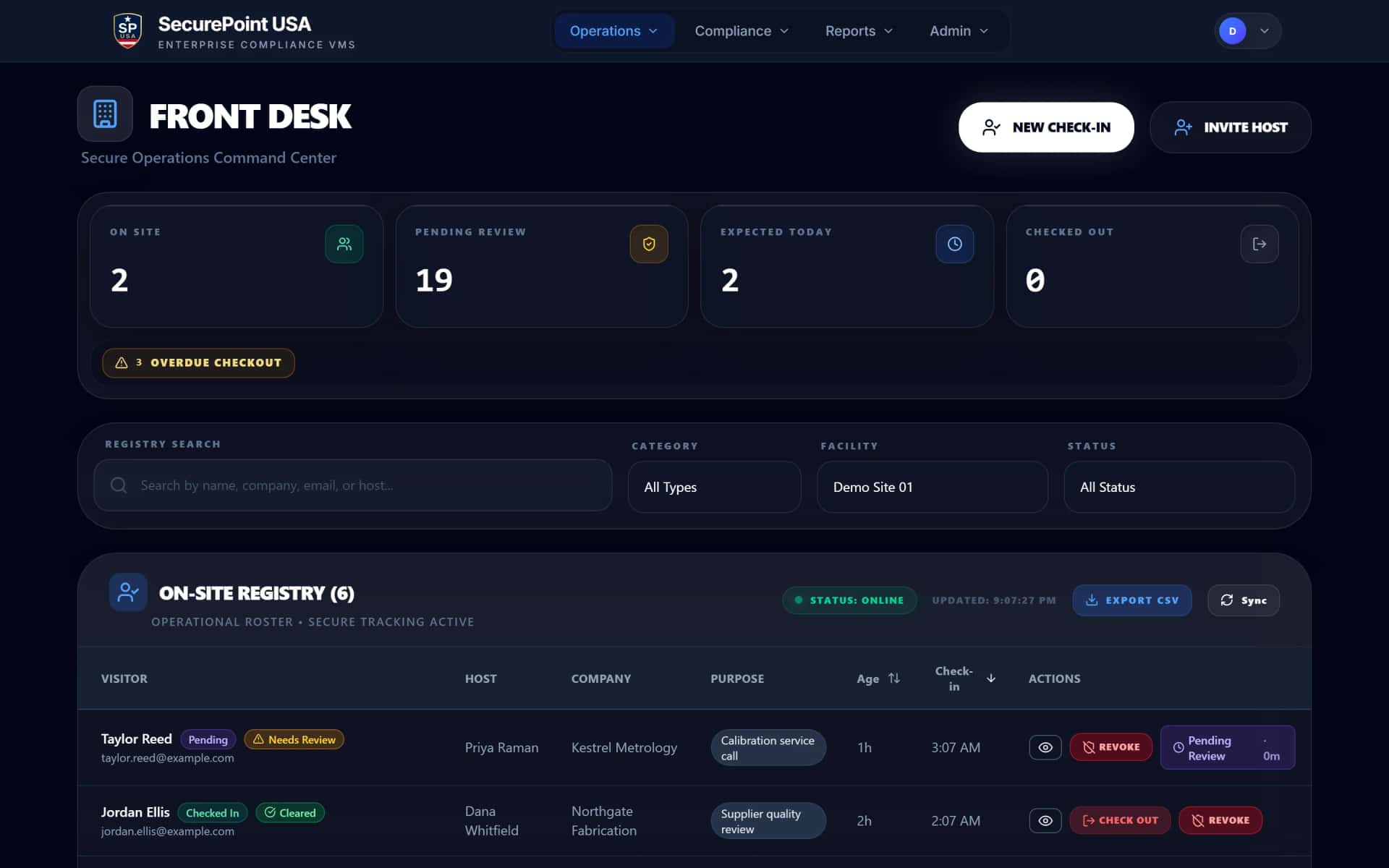
- Front-desk clear / flag / block decision workflow

During Visit
Host coordination and status visibility
- Host Hub alerts on visitor arrival
- Live visitor status across the facility
- Escort and coordination workflows
- Visit extension and amendment controls

After Visit
Checkout, reporting, and evidence retention
- Structured checkout with timestamp capture
- After-visit reporting with full session evidence
- Append-only audit logs with decision history
- Long-term evidence retention for regulatory review
The agreement and briefing each visit needs
Read the transcript
Admins set up the visitor agreement and the safety briefing, and switch each one on for a site or a visit purpose.
Hosts can add them to an invite. The visitor acknowledges them while registering, or at check-in when the site requires them at every visit.
At sites that turn it on, visitors who list U.S. citizenship attest they're a U.S. person. Others acknowledge their visit may need an escort and more review.
At the kiosk, signing stays locked until the visitor reaches the end of the agreement, and the safety briefing comes next.
At the front desk, visitors can sign on their own phone or right at the desk, with a typed or drawn signature.
The signature is saved with the visit, along with the name they gave and the time, and staff can open a receipt.
And if a required step is missing, the front desk sees what's still needed before the badge can print.
SecurePoint Visitor. Screen visitors at check-in, and keep the decisions on record.
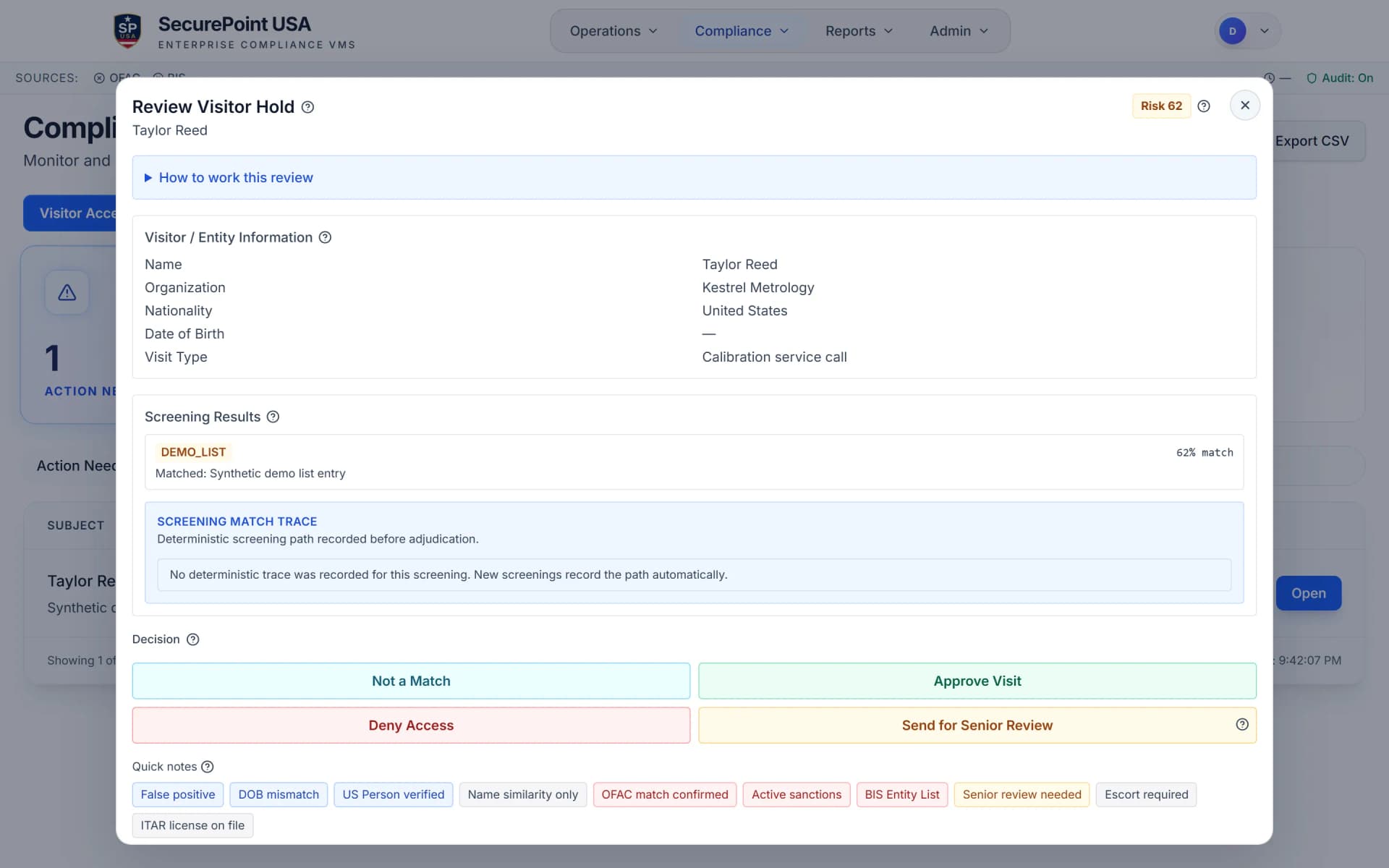
Screening UI
Real-time sanctions screening with clear / flag / block decision workflows
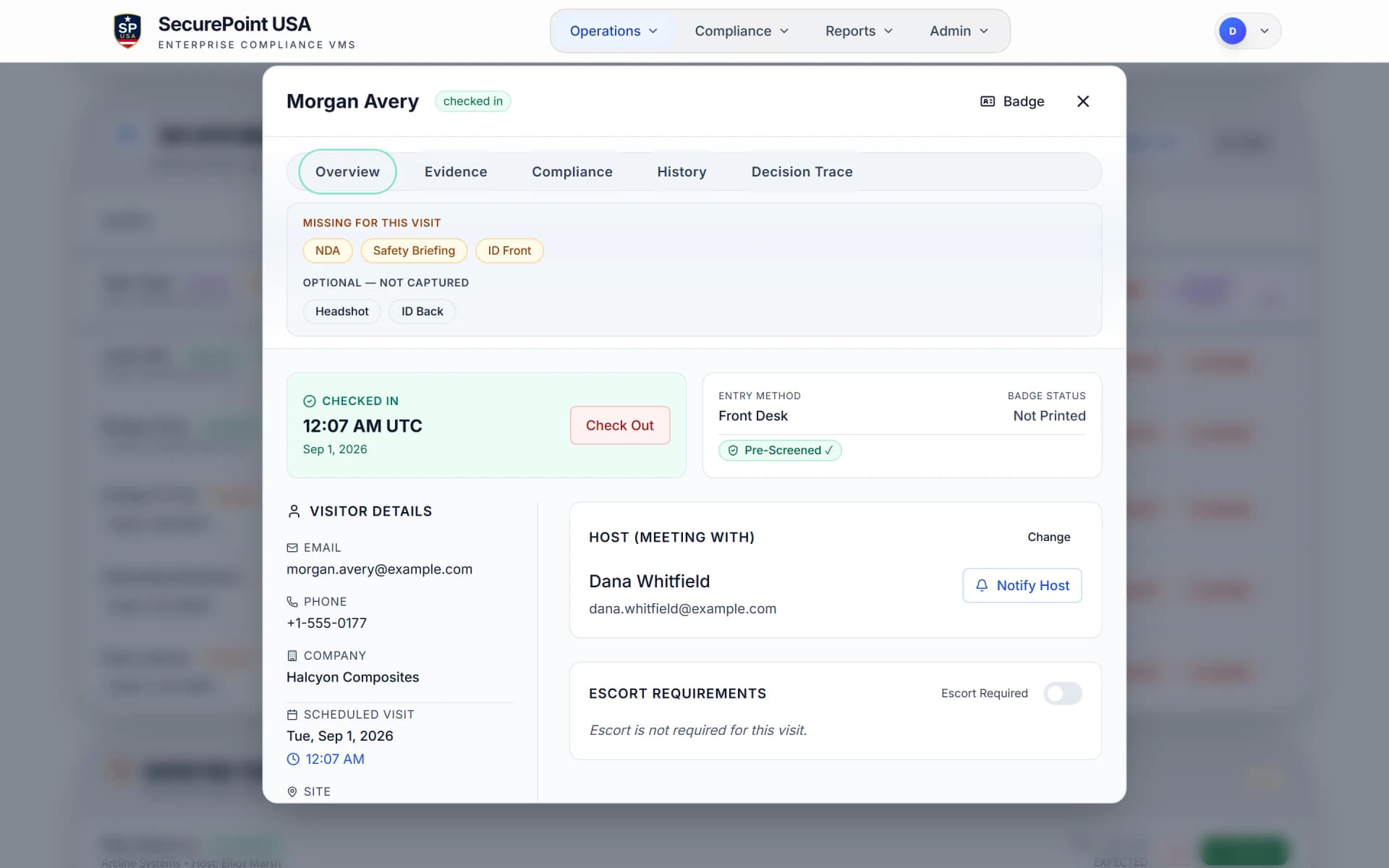
Badge Control
Hold the badge until screening clears and the required documents and ID capture are on the visit
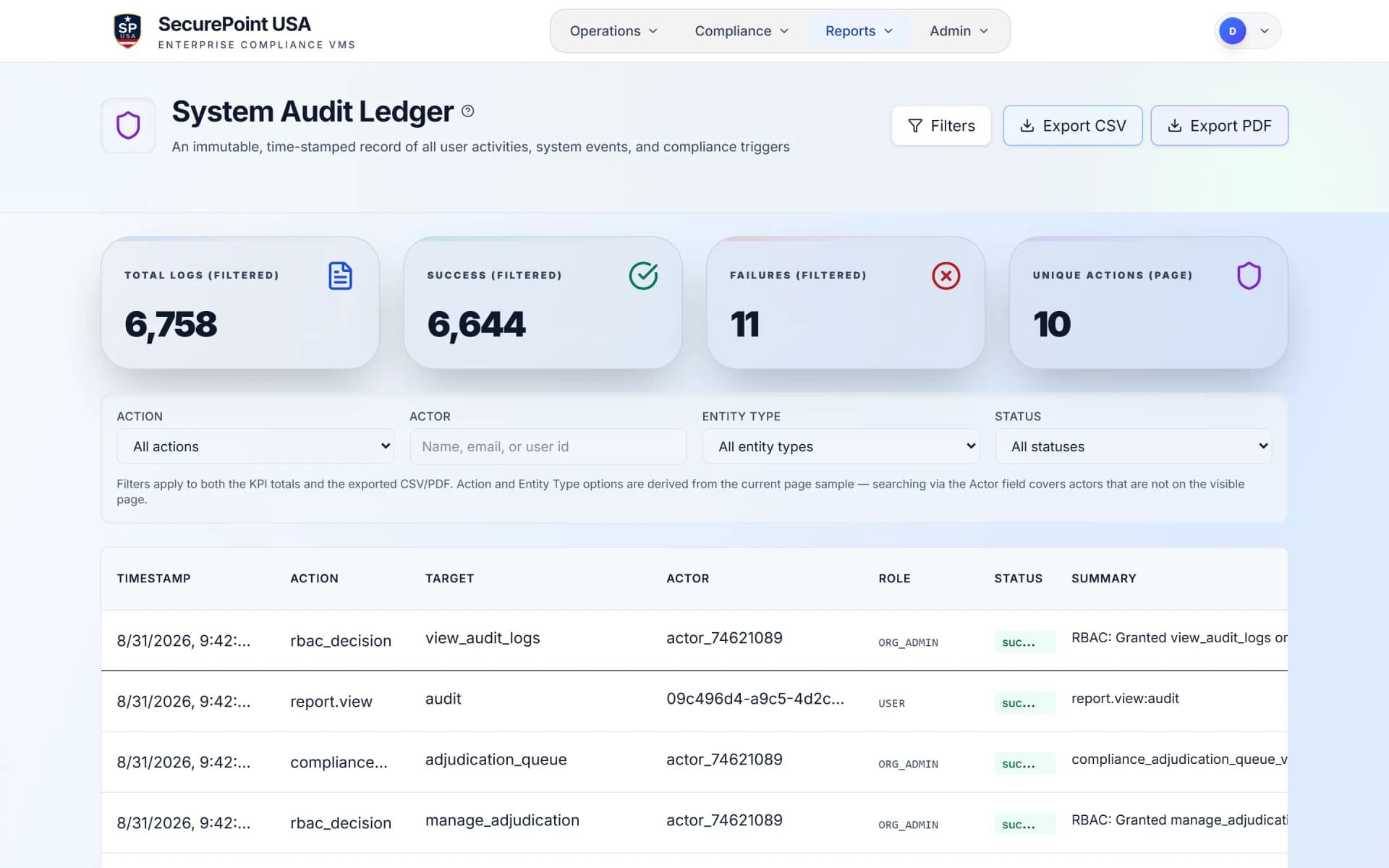
Evidence Log
Append-only audit timeline capturing every workflow step for regulatory review
Operational Modules
Six modules that run the visit
Each module handles a distinct operational function. Together they form a complete visitor management system with audit-ready evidence at every step.
ID Scanning & Badge Control
Capture government-issued IDs at check-in. Generate visitor badges with site restrictions, visual indicators, and expiration controls. Badge records tie to the visitor session for audit.
Host Hub & Notifications
Real-time alerts when visitors arrive. Host Hub gives designated personnel visibility into visitor status, pending approvals, and coordination tasks without touching the front-desk system.

After-Visit Reporting
Generate structured reports after checkout with complete session data: screening results, host assignments, badge records, timestamps, and reviewer actions. Evidence packs ready for audit.

Screening & Review
Multi-list sanctions screening at check-in against OFAC SDN, BIS Entity List, UN, EU, and UK control lists. Flagged visitors route to human review with structured adjudication workflows.

Front Desk Workflow
Purpose-built check-in interface for front-desk operators. Clear / flag / block decisions with guided workflows, photo capture, badge printing, and visitor queue management in one view.
Audit Logs & Evidence
Append-only audit trail for every visitor action: check-in, screening, review decisions, badge issuance, host notifications, and checkout. Append-only records carry timestamps, actor attribution, and export verification paths.
When a check-in step is missing
Read the transcript
A badge is only available once the visitor is checked in and approved.
While a possible match is under review, the visitor is asked to wait for staff, and the badge stays unavailable.
Here, the visitor agreement and a photo of their ID are missing, so the badge is refused, and the desk sees what's still needed.
Once those steps are done, the badge is available.
SecurePoint Visitor. Screen visitors at check-in, and keep the decisions on record.
Built for Every Role
One platform, every stakeholder covered

Advanced Cybersecurity Level
Built to support CMMC Level 2 compliance
For Defense Industrial Base (DIB) contractors handling Controlled Unclassified Information (CUI), CMMC Level 2 isn't optional. It's the barrier to entry for DoD contracts.
SecurePoint Visitor provides visitor access workflows and evidence needed to support physical security reviews. Screening status and badge issuance stay attached to the visit, zone approvals are recorded against it, and evidence packs export the result, so teams can document how restricted-area visitor decisions were handled.
Access Control Alignment
Screening outcome and badge issuance stay tied to the visit record, and escort assignment is captured in the CMMC PE visitor evidence set.
Append-Only Evidence
Append-only audit logs and export verification data give CMMC assessors a clearer record of who entered, when, and who permitted them.
Escort Workflow Validation
Validate escorted access workflows for uncleared or foreign national visitors, integrated directly into the host notification workflow.
Identity Verification
Scan and log government-issued IDs at check-in to satisfy positive identity verification requirements.
Foreign-person visits: escort, confirm, report
Read the transcript
When the site requires it, a visitor who lists another country of citizenship acknowledges they're a foreign national, and that the visit may need an escort and more review.
The kiosk asks the visitor to wait for their host. The host gets an email asking them to come to the kiosk, check the visitor's photo ID, and print the badge. It also says the visit needs an escort.
At the kiosk, the host enters their name and confirms three things: they checked the visitor's nationality on their ID, they'll escort them at all times, and they won't share export-controlled technical data without authorization. Then the kiosk prints the badge.
When the visitor checks out, the host is asked for an after-visit report: whether any controlled technical data was shared, and a short summary. If it's late, reminders follow.
SecurePoint Visitor. Screen visitors at check-in, and keep the decisions on record.
Operational Depth
Built for real facility operations
SecurePoint Visitor is not a lobby sign-in app. It is an operational layer that integrates into how regulated facilities actually manage physical access, visitor coordination, and compliance evidence.
Operating principle
Every visitor interaction, from preregistration through checkout, produces structured evidence, backed by an append-only audit trail, that can be exported, reviewed, and retained for years.
Access Control Alignment
Badge parameters and screening decisions map to approved zones and badge indicators. Security teams can track which areas a visitor was approved to access and when escort workflows were started.
Physical Security Workflows
Escort assignments, visitor status tracking, and real-time alerts support security teams managing visitor movement through controlled areas.
Onboarding & Support
Guided implementation with site-level configuration, front-desk training, and kiosk deployment support for operational readiness.
Audit & Compliance Readiness
ITAR, EAR, CMMC, and DFARS-aligned workflows with evidence packs, decision history, and export-ready audit logs built in.
What sets SecurePoint Visitor apart
Full visit lifecycle from preregistration through after-visit reporting.
Unlimited sanctions screenings at fixed monthly pricing.
Host Hub with real-time arrival notifications and coordination.
ID scanning, photo capture, and badge control at check-in.
Append-only audit logs designed for CMMC and ITAR evidence workflows.
After-visit reports with complete session evidence for every visitor.
Frequently Asked Questions
What is an ITAR visitor management system?
An ITAR visitor management system is a full-lifecycle platform that manages preregistration, ID capture, sanctions screening, host coordination, badge control, and audit evidence from an append-only log for facilities handling controlled technical data.
Do I need to screen visitors under ITAR?
Organizations handling controlled technical data should apply visitor screening and access controls to support documented approvals and export compliance reviews.
How does real-time sanctions screening work?
At check-in, the system compares visitor data against OFAC, BIS, UN, EU, and UK sanctions lists and returns a clear, flag, or block recommendation with a timestamped audit record.
What happens after a visitor checks out?
SecurePoint Visitor generates after-visit reports with complete session evidence: check-in and checkout timestamps, screening results, host assignments, badge records, and reviewer actions, all retained as append-only audit logs.
How does SecurePoint Visitor handle host notifications?
Host Hub sends real-time alerts when visitors arrive, gives hosts visibility into visitor status, and supports coordination workflows including escort assignments and visit approval.
How much does an ITAR visitor management system cost?
Costs vary by vendor. SecurePoint USA positions visitor pricing as fixed per-site pricing rather than a per-screening fee model, which gives defense teams a clearer starting point for budgeting.
Related Resources
SecurePoint Visitor Overview
Full-lifecycle visitor management for regulated facilities.
ITAR Visitor Management
Foreign national screening and access logging for ITAR programs.
CMMC Visitor Logging
Audit trails that support CMMC Level 2 physical security controls.
ITAR Visitor Requirements (2026)
Educational guide for FSOs and compliance teams.
After-Visit Reports
How SecurePoint Visitor generates post-checkout evidence.
ITAR Screening Whitepaper
22 CFR foreign national requirements and screening workflows.
You can also explore the Host Hub, screening engine, or defense contractor visitor management.
See how SecurePoint Visitor handles the full visit lifecycle
Walk through preregistration, check-in, screening, host coordination, and after-visit reporting with your team.