Screening once is not enough
Automated re-screening, actionable alerts
Scheduled re-screening
Every 30 or 90 days (30 by default), active parties are re-screened against the latest OFAC, BIS, UN, and other list data SecurePoint holds.
Status change alerts
When a re-screen finds a new possible match for a previously clear party, a case opens in your review queue and your team receives a digest email.
Timestamped logs
Every re-screening event is logged with the list version, date, and result. Full history available for any party.
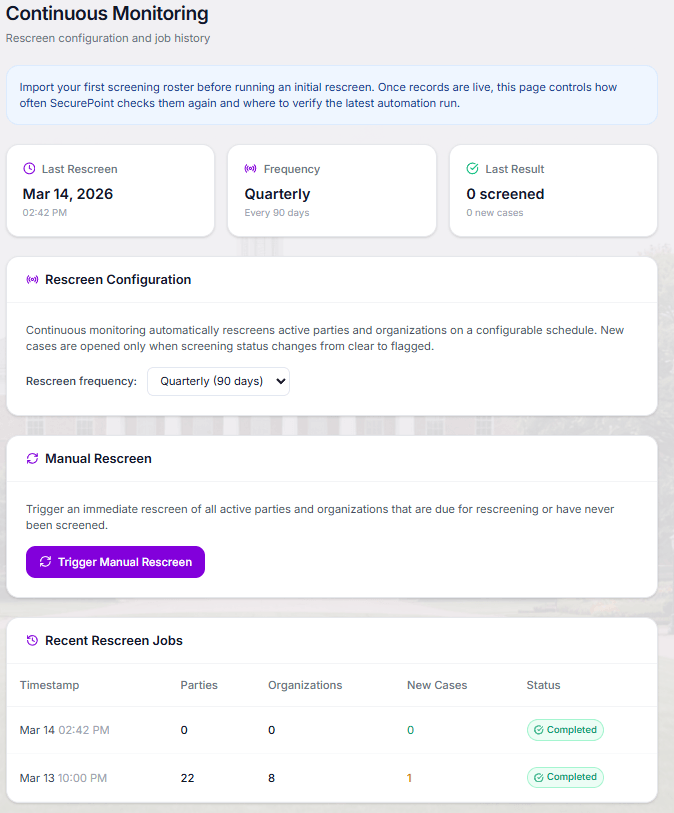
Monitoring Dashboard
One view of every monitored party
A single view of all monitored parties, their current status, last screening date, and any pending alerts.
- Active monitoring count and breakdown
- Last screening date for every party
- Review queue for new matches
The Monitoring Cycle
Re-screen Due
Each party comes due for re-screening on your 30- or 90-day schedule.
Automated Re-screening
Due students and payors are re-screened against the latest list data SecurePoint holds.
New Case
If a previously clear party now matches, a case opens for review and your team receives a digest.
Related Solutions
Build a complete education compliance program
OFAC Screening for Schools
Why OFAC enforcement applies to educational institutions and what schools must screen.
Learn moreTuition Payor Screening
Screen parents, guardians, sponsors, and third-party tuition payors beyond the enrolled student.
Learn moreEvidence Packs
Audit-ready documentation for every screening and re-screening decision.
Learn moreOFAC Licensing Paths
What to do when continuous monitoring surfaces a confirmed match mid-year.
Learn moreMonitoring FAQ
Stay compliant through the full academic year
Ensure your institution is protected against list changes as they happen.